
|
Fig 12
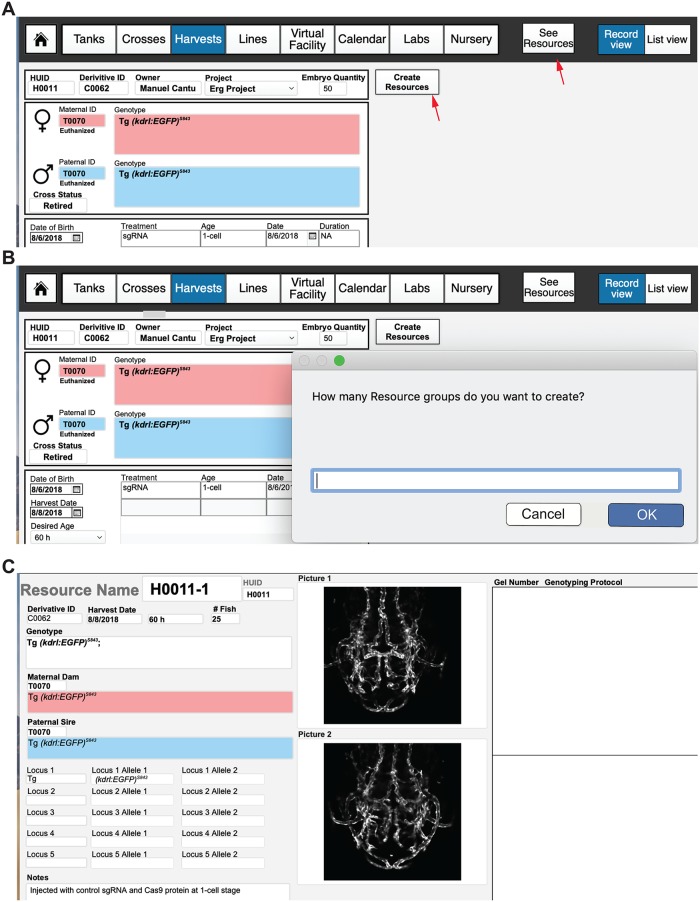
(A) Embryo harvest template. Creating a new record in the “Harvests” layout will create a new HUID record, where information such as the cross used to produce embryos, the genotypes and TUIDs of the parents, the date of collection, and number of embryos can be entered. Information regarding any chemical or genetic treatments, the age of collection, any genotyping to perform, and downstream tissue processing can be entered into this record as well. (B) After an embryo/adult quantity is added, a user can select the “Create Resources” tab to create a unique Harvest ID (H000X-1 if one resource, 1 and 2 if two, and so on) for each embryo group or adult fish that is processed. Selecting “Create Resources” will prompt the user to select the number of groups that embryos or adults are going to be divided into. If the original embryo quantity is 50, the user could make 2 groups of 25 embryos, each with a different experimental condition. (C) Viewing the resources takes the user to an individual record view of all “resources” associated with that harvest. Information regarding genotype, tissue processing and images of the embryos can store here to create permanent records of any experimental harvest. HUID, harvest unique identifier; TUID, tank unique identifier.